Drive the Mobile Device You Can't Host: iOS Simulators from Linux, Android Emulators from a Mac


A question keeps coming up with the mobile teams I work with: can we run Android emulator tests on our Mac CI machines, next to the iOS ones? One machine, both platforms — it sounds reasonable, and the answer is a flat no, for a reason that quietly shapes how a lot of mobile pipelines get built. A modern Android emulator needs hardware acceleration, and the Macs you rent from a cloud CI provider are themselves virtual machines whose virtualization layer does not expose nested virtualization to the guest. No nested virtualization, no acceleration — the emulator either refuses to start or crawls along in software at a speed that turns "fast feedback" into a punchline. Most teams confirm this in ten minutes and a support thread, then give up and split the work: Android on Linux, iOS on the Mac, which becomes a normal practice.
That compromise is common enough to feel like a law of physics, but it nagged at me. Plenty of cross-platform suites genuinely want one machine to drive both an iOS simulator and an Android emulator in the same run — an end-to-end flow, a React Native or Flutter app exercised on both at once, an agentic testing plan. I decided to challenge the norm, what I found is less a hack than a small shift in where you let a device live, and it generalizes well past this technical constraint.
The reframe
The assumption worth questioning is hiding in plain sight: that the machine using the emulator has to be the machine running it. It doesn't. adb — the tool every Android workflow leans on — is not a local API. It is a client talking to a daemon over TCP. When you install an APK, tap a button, run an instrumented test, or read logs, adb is already speaking a network protocol; it just happens to be talking to localhost most of the time. So the Mac doesn't need to host an Android emulator. It needs to talk to one. Run the emulator where acceleration is free — any Linux box with KVM — expose its adb endpoint, and you can teleport that connection across the network so the device behaves as if it were plugged in under the desk.
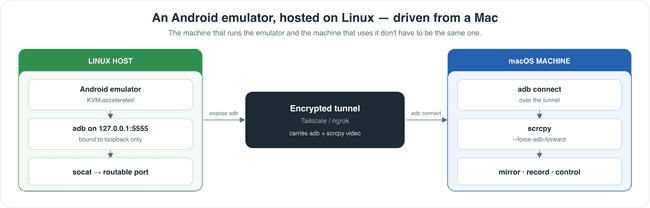
The emulator only listens to itself. The Android emulator binds its adb port to 127.0.0.1 and gives you no flag to change that. From the host's own loopback it is reachable; from anywhere else it may as well not exist. The fix is unglamorous — a small socat bridge forwarding a routable port to the loopback one — but it is the kind of detail that stays invisible until it costs you an afternoon. The usual adb tcpip trick, incidentally, is for physical devices; emulators ignore it.
The two machines can't see each other. A Linux host in one place and a Mac in another are, by default, two islands behind NAT with no route between them. You need something to bridge the gap. A relay like ngrok does it in one command and is perfect for a quick proof; for anything you would run repeatedly, a private mesh like Tailscale is the better answer — a direct, encrypted, peer-to-peer link with stable names instead of a fresh random URL every time. Either way, the network is now part of your test harness, with all the latency and failure modes that implies.
Streaming the screen fights the tunnel. Once adb works across the wire you can do everything headless — install, instrument, tap, assert. But if you want to actually see the device, scrcpy streams its screen back to you, and scrcpy assumes a local connection. Its default method for wiring up that stream uses adb's reverse tunneling, which quietly fails across a relayed link. The flag that fixes it, --force-adb-forward, took longer to find than I would like to admit. Worth saying plainly: for automated tests you do not need scrcpy at all. adb is the workhorse; the stream is the layer you add when a human wants to watch.
None of this is free, and it is worth being honest about the bill. Every adb command is now a round trip across a network instead of a hop to localhost, so a suite that hammers adb gets slower — noticeably, sometimes one and a half to three times, depending on the distance between the two machines. There is a coordination problem, too: the emulator host has to come up first and stay alive while the Mac uses it, then tear down cleanly, and getting two short-lived machines to find each other without a shared network is its own small puzzle. This is an architecture, not a hack, and treating it like a hack is how you end up debugging it at midnight.
But it works. A Mac that fundamentally cannot run an Android emulator can drive one running somewhere else, stream its screen, record it, and exercise a cross-platform suite against both an iOS simulator and a remote Android emulator from a single process. The constraint that stops most teams turns out to be a constraint on hosting, not on use.
The other way around
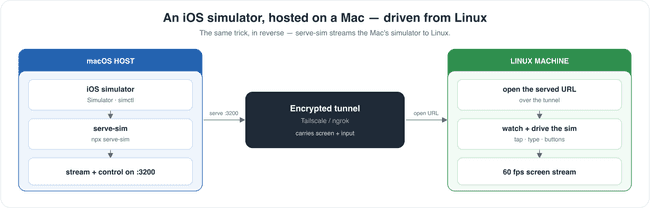
The symmetry is the whole point, so it is worth making explicit. The constraint is not special to Android. iOS simulators only run on macOS, which means a Linux or Windows machine has exactly the same problem in reverse — and exactly the same escape. Here the tooling is even friendlier: serve-sim was built for almost exactly this. It runs on the Mac, captures the booted simulator's framebuffer, and serves both a live screen stream and an input channel over a single HTTP port. Boot the simulator on a Mac, run npx serve-sim, tunnel that port, and from Linux you open the served URL to watch the simulator and drive it — taps, typing, hardware buttons, even dragging a file in. A different stack from adb and scrcpy, but the identical shape: host the platform where it runs, and stream it to wherever you happen to be.
Devices as a service
Follow that thread one more step and the workaround starts to look like a product. If the only thing the consumer needs is a network connection and something to decode a video stream, then the heavy, awkward, expensive part — the accelerated emulator, the Apple-silicon host, the simulator and its gigabytes of runtime — can live in a pool somewhere and be handed out on demand. The machine that wants a device no longer has to be capable of running one. A modest Linux runner, a laptop, even a browser tab can drive a fully accelerated Android emulator or a real iOS simulator, because all it is really doing is sending taps and receiving frames.
This is the same bet that put games and desktops in the cloud, and it pays off here for the same reason: modern video streaming is cheap, fast, and good. A hardware-encoded H.264 stream with an input channel beside it keeps the consuming side nearly free — a few megabits and a decoder, no special hardware, nothing to install — while a direct peer-to-peer path, rather than a relay across the planet, keeps the round trip short enough that interacting with a remote device feels close to local. Pool the hosts, lease each consumer an ephemeral one for the length of a session, and "give me an Android device" turns into an API call instead of a hardware decision. The device-farm vendors already sell a version of this; what is new is that the building blocks are open and ordinary enough for a team to assemble the same shape itself.
The part that stayed with me
The technical answer is satisfying, but the thing I keep coming back to is the assumption I almost let stand. I had treated "the emulator runs here" and "the emulator is used here" as one fact, when they were two. The moment a capability speaks a network protocol — and most of them do now — its location becomes negotiable. Where a thing runs and where it is consumed are separate decisions, and we collapse them out of habit, not necessity.
Once you start looking, the pattern is everywhere. The database does not live in your app. The GPU does not live in your laptop. The build does not run on the machine you typed the code on. We accepted remoteness for all of those without a second thought, and yet "the emulator has to be on the machine running the tests" felt like a law of physics until I poked it. It wasn't. Most of these walls aren't.
That is the souvenir I took from this one. When you hit a hard constraint, it is worth asking which half of the sentence the constraint actually applies to. Sometimes the thing you can't do and the thing you actually need are not the same thing, and the gap between them is where the interesting work hides.